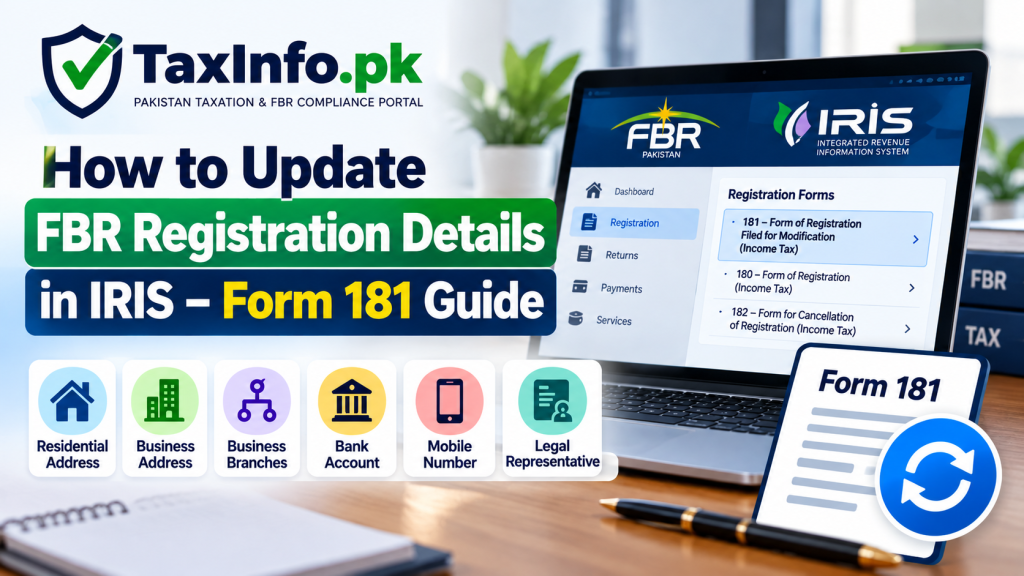
If your address, mobile number, bank account or business information has changed after registering with the Federal Board of Revenue (FBR), you may need to update FBR registration details in IRIS.
FBR allows taxpayers to modify several registration particulars online through Form 181 – Form of Registration Filed for Modification (Income Tax). However, not every change can be completed online, and certain registration changes still require you to approach the relevant Regional Tax Office (RTO).
This guide explains what Form 181 is, which details you can update online, which changes require an RTO visit, and how the registration modification process works.
If you have not registered with FBR yet, first read our NTN Registration Online in Pakistan guide.
Table of Contents
What Is FBR Form 181?
Form 181 is used for registration-related matters under Pakistan’s income tax system.
When an already registered taxpayer needs to correct, add or modify relevant registration particulars, the taxpayer can use:
181 – Form of Registration Filed for Modification (Income Tax)
FBR states that an Income Tax Registration can be modified where a change or omission is discovered in information, particulars, data or documents associated with the person’s registration.
The modification form is filed through IRIS for the particulars that FBR allows taxpayers to change online.
You can access the official system through the FBR IRIS Portal.
When Do You Need to Update FBR Registration Details?
Your FBR registration profile should reflect your relevant current information.
A modification may become necessary, for example, when:
- your residential address changes;
- your mobile number changes;
- you need to add or change a business address;
- you establish an additional business branch;
- you need to add or update a bank account;
- your business particulars need modification; or
- other information associated with your registration needs to be corrected or updated.
Keeping your registration information accurate can also make future tax compliance easier.
If you are preparing to file your annual return, see our Income Tax Return Filing Guide for Pakistan.
Which FBR Registration Details Can Be Updated Online?
According to FBR’s current guidance, the following information can be changed or updated through Registration Form 181 filed for modification in IRIS:
| Registration Detail | Online Through Form 181? |
|---|---|
| Mobile Number | Yes |
| Personal / Residential Address | Yes |
| Business Address | Yes |
| Addition of Business Branches | Yes |
| Legal Representative under Section 87 | Yes |
| Bank Account | Yes |
Therefore, if your required change falls into one of these categories, you may generally start the modification process through IRIS.
Always check the fields and instructions displayed in the current IRIS system because the portal interface may be updated by FBR over time.
Which Changes Require a Visit to the RTO?
An important point is that not every FBR registration detail can currently be changed online through Form 181.
FBR states that a taxpayer has to visit the relevant Regional Tax Office for registration changes concerning:
- discontinuance of business;
- jurisdiction for Income Tax Return assessment;
- deregistration;
- updating CNIC number;
- email address; and
- updating Pakistan Origin Card (POC).
Relevant supporting documents should be taken to the RTO for such changes.
This distinction is particularly important for taxpayers trying to change their email address or CNIC information. These items appear in FBR’s current list of changes requiring an RTO visit rather than the list of particulars that can be updated directly online.
For the latest official position, see FBR – Change Your Personal Details.
How to Update FBR Registration Details in IRIS
The general process to update FBR registration details in IRIS is explained below.
Step 1: Log In to FBR IRIS
Open the official FBR IRIS Portal and sign in using your registration number and password.
For an individual, the CNIC is generally used as the registration number/NTN after registration.
If you cannot access your account, do not create another registration simply because you have forgotten your password.
Instead, use the account-access options explained in our FBR IRIS Login, Forgot Password & Account Recovery Guide.
Step 2: Open Form 181 for Modification
After logging in, locate the registration section and select:
181 – Form of Registration Filed for Modification (Income Tax)
FBR’s published IRIS guidance identifies Form 181 as the form used for modifying Income Tax registration particulars.
The exact visual arrangement of menus may change as IRIS is updated, so rely primarily on the Form 181 description rather than an old screenshot or menu position.
Step 3: Select the Relevant Period
IRIS may ask you to select the relevant tax period when creating the Form 181 modification task.
Choose the appropriate period displayed by the system and open the modification form.
Once the form opens, review the information already appearing in your registration profile before making any changes.
Do not modify unrelated information unnecessarily.
Step 4: Update the Required Information
Go to the relevant section of Form 181 and enter the information you actually need to change.
Depending on the modification, this could involve your:
- address;
- business information;
- branch information;
- bank account;
- mobile number; or
- other online-modifiable registration particulars.
Enter the information carefully and ensure it corresponds with your supporting records.
How to Change Your Residential Address in FBR IRIS
FBR specifically lists Personal/Residential Address among the particulars that can be updated through Form 181.
If your residence has changed, open the relevant address section of the modification form and provide your current information.
Check details such as:
- complete address;
- city/district or other location fields requested by IRIS;
- capacity or ownership/occupancy information where requested; and
- any supporting information required by the current form.
Before submitting, make sure the address you intend to use is correctly reflected in the registration form.
How to Update a Business Address or Add a Business Branch
Form 181 can also be used to modify a Business Address and add Business Branches.
This can be relevant if you:
- start a new business;
- move your existing business premises;
- add another branch;
- need to update existing business particulars; or
- need to associate appropriate business information with your registration.
If you are adding or updating a business, carefully select the appropriate business information and activity requested by IRIS.
The business activity should reflect the nature of the actual business rather than an unrelated category selected merely to complete the form.
Depending on the modification and the fields presented by IRIS, supporting evidence relating to the business premises may also be relevant.
How to Add or Update a Bank Account in FBR IRIS
FBR includes Bank Account among the registration particulars that can be updated through Form 181.
Open the relevant bank-account section and enter the information requested by IRIS.
Make sure that the:
- bank details are correct;
- account information belongs to the appropriate taxpayer/business, as applicable; and
- information matches the supporting banking record you are relying on.
Incorrect bank information can create unnecessary complications, so review account details carefully before submitting the form.
How to Change Your Mobile Number in FBR IRIS
A mobile number is also included in FBR’s list of information that can be updated through Form 181.
If your registered number is no longer in use, open Form 181 and locate the relevant contact information.
Enter the new mobile number according to the format required by IRIS and complete any verification step shown by the current system.
Remember that FBR treats the mobile number and email address differently for modification purposes: its current guidance lists mobile-number changes among online Form 181 modifications, while an email-address change is listed among matters requiring a visit to the relevant RTO.
Can You Change Your Email Address Through Form 181?
According to FBR’s current published guidance, an email-address change requires the taxpayer to visit the relevant RTO.
Therefore, do not assume that because your mobile number can be modified online, your email address can necessarily be changed through the same process.
Take the relevant documents and identification required for the registration change when approaching the RTO.
Can You Change Your CNIC Number Online?
FBR currently lists updating CNIC number among the registration changes for which the taxpayer has to visit the relevant RTO.
Therefore, Form 181’s online modification facility should not be treated as a way to independently replace or alter CNIC information where FBR requires RTO processing.
Documents You May Need for Registration Modification
The exact documents depend on the information you are modifying.
It is sensible to keep supporting evidence ready for the requested change. Depending on the circumstances, relevant documentation may include evidence connected with:
- your identity;
- residential or business premises;
- ownership or tenancy;
- bank account information;
- business particulars;
- legal representation; or
- another registration detail being modified.
For changes that FBR requires to be processed at an RTO, FBR expressly states that the person should take the relevant documents to the RTO.
Do not upload unrelated or inaccurate documentation merely to complete the application.
Review Form 181 Before Submission
Before submitting the modification form, review the entire relevant information carefully.
Check:
Personal information:
Make sure information that you intended to change is correct.
Address:
Check spelling and location details.
Business information:
Confirm the business name, address, activity and other relevant particulars.
Bank information:
Double-check account details.
Attachments:
Where documents are required, make sure the correct documents have been attached.
It is better to identify an error before submission than to discover it after the modification request has entered the FBR process.
Submit Form 181
Once the relevant information has been completed and reviewed, submit the Form 181 modification request through IRIS.
Follow any confirmation or verification instructions displayed by the current portal.
Keep a copy or electronic record of the submitted form and any acknowledgement available in IRIS for your records.
What Happens After Form 181 Is Submitted?
Submission of Form 181 should not automatically be interpreted as approval of every requested change.
FBR’s registration guidance states that the Commissioner will grant or refuse the requested modification after examining the modification form and making any inquiry considered necessary.
This means taxpayers should check the status and resulting registration information rather than assuming that every requested modification became effective simply because the form was submitted.
FBR also states that a person may file a representation before the Chief Commissioner within 30 days of the decision regarding modification. The Chief Commissioner then decides the representation on its merits.
See the official FBR Income Tax Registration guidance for the current published position.
Verify Your Updated Registration Details
After the modification has been processed, check that the intended information is correctly reflected in your taxpayer profile.
FBR provides online verification services through its digital systems.
Our NTN Check by CNIC Online Guide explains how taxpayers can use FBR’s verification facilities for registration-related information.
Keeping a copy of your submitted Form 181 can also be useful for your own records.
Common Form 181 Mistakes to Avoid
1. Trying to Change Every Detail Online
Some taxpayers assume Form 181 can modify every item in their FBR profile.
That is not the case. For example, FBR currently lists CNIC-number and email changes among matters requiring an RTO visit.
2. Entering an Incorrect Business Activity
Choose the business activity that accurately describes your actual business.
3. Providing an Incomplete Address
Enter complete and accurate address information according to the fields provided in IRIS.
4. Adding Incorrect Bank Details
Always verify account information before submitting it.
5. Using an Unofficial Website
CNIC, NTN, passwords and other taxpayer information are sensitive.
Use the official FBR IRIS Portal rather than providing your credentials to an unknown third-party website.
6. Assuming Submission Means Approval
A submitted modification request may still be examined by FBR. Check the resulting status and registration information after submission.
Important Compliance Point
Updating your FBR registration information and filing your annual Income Tax Return are separate compliance actions.
Changing your address or business details through Form 181 does not itself constitute filing an Income Tax Return.
Similarly, registration with FBR does not by itself mean that all annual filing requirements have been completed.
If you want to understand the overall process, read our How to Become a Filer in Pakistan guide.
Frequently Asked Questions
What is Form 181 in FBR IRIS?
Form 181 is used for Income Tax registration matters, including modification of relevant registration particulars. Existing taxpayers can use the modification form in IRIS for information that FBR permits to be updated online.
Can I update my FBR address online?
Yes. FBR currently lists personal/residential address and business address among the information that can be updated through Registration Form 181 filed for modification.
Can I change my mobile number in FBR IRIS?
Yes. FBR currently lists mobile number among the registration particulars that can be updated through Form 181.
Can I change my FBR email address online?
FBR’s current published guidance lists an email change among registration matters for which the taxpayer has to visit the relevant RTO.
Can I update my CNIC number through Form 181?
FBR currently states that updating the CNIC number requires a visit to the relevant RTO.
Can I add a bank account through Form 181?
Yes. Bank account information is included in FBR’s list of particulars that can be updated through Registration Form 181.
Can I add another business branch through Form 181?
Yes. FBR lists the addition of business branches among the information that can be updated through Form 181.
Is Form 181 the same as an Income Tax Return?
No. Form 181 concerns registration information. An annual Income Tax Return is a separate filing.
Does submitting Form 181 mean my modification is automatically approved?
Not necessarily. FBR states that the Commissioner may grant or refuse the requested modification after examining the form and making any inquiry considered necessary.
What if FBR refuses my registration modification?
FBR states that a person may file a representation before the Chief Commissioner within 30 days of the decision regarding the modification.
Final Words
If your taxpayer information has changed, it is important to keep your FBR registration profile accurate.
For many common changes, you can update FBR registration details in IRIS by filing Form 181. This includes changes to your mobile number, personal/residential address, business address, business branches, legal representative and bank account.
However, certain matters—including CNIC-number changes, email changes, deregistration and jurisdiction-related changes—currently require dealing with the relevant RTO.
Always use the current IRIS portal and official FBR guidance when making a registration modification because online forms, interfaces and procedures can change over time.
Official Resources
FBR – Change Your Personal Details