How to Check STRN Online in Pakistan – FBR Sales Tax Verification Guide
If you want to check STRN online in Pakistan, it is important to understand what exactly you are verifying. A business may be registered for Sales Tax, while its current status on the Sales Tax Active Taxpayer List (ATL) is a separate compliance matter.
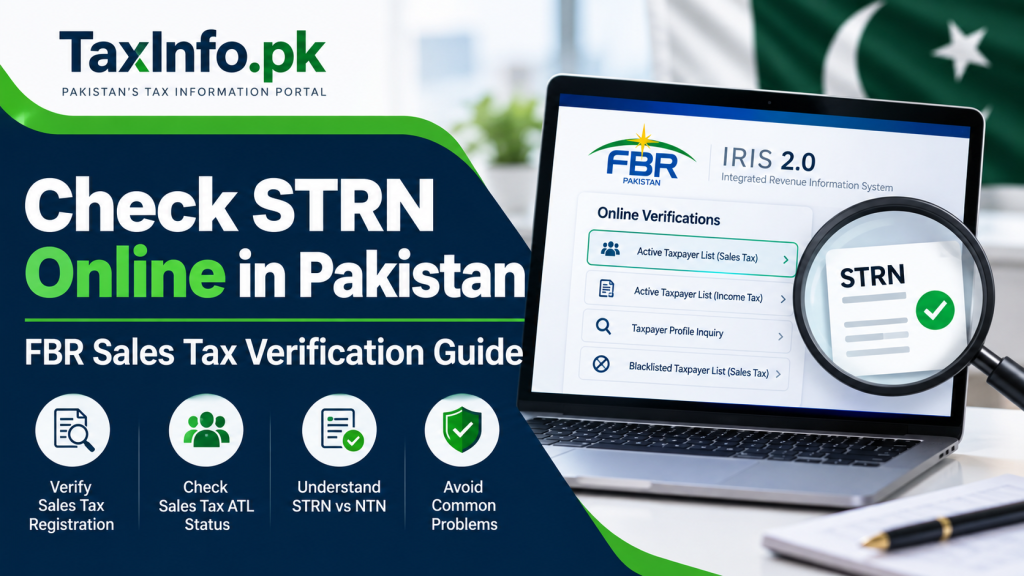
The Federal Board of Revenue (FBR) provides online verification facilities through IRIS 2.0, including the Active Taxpayer List (Sales Tax), Taxpayer Profile Inquiry and Blacklisted Taxpayer List (Sales Tax).
This guide explains how to check Sales Tax registration-related information online, verify Sales Tax ATL status, understand the difference between NTN and STRN, and know what to look for before dealing with a supplier.
Table of Contents
What Is an STRN in Pakistan?
STRN stands for Sales Tax Registration Number.
A person or business registered for Sales Tax with FBR receives Sales Tax registration for carrying out the applicable Sales Tax compliance requirements.
FBR explains that Sales Tax registration provides the taxpayer with an STRN and access credentials for the relevant online system.
An STRN is particularly important for businesses that are required to:
- charge Sales Tax on applicable taxable supplies;
- issue compliant Sales Tax invoices;
- report taxable transactions;
- file Sales Tax returns; and
- maintain the records required under Sales Tax law.
Having an NTN for Income Tax purposes should not automatically be treated as proof that a person is registered for Sales Tax.
If your business needs Sales Tax registration, see our Sales Tax Registration in Pakistan – FBR IRIS Step-by-Step Guide.
How to Check STRN Online Through FBR
FBR provides public online verification facilities through its official FBR IRIS 2.0 portal.
The available Online Verifications include facilities for checking different types of taxpayer information.
For Sales Tax purposes, the exact facility you use depends on whether you want to examine taxpayer registration information or determine whether the taxpayer is currently appearing as active for Sales Tax purposes.
Step 1 – Open the Official FBR IRIS Portal
Visit the official FBR IRIS 2.0 portal.
For public verification, use the relevant Online Verifications facility available on the portal.
Always make sure that you are using an official FBR website rather than entering taxpayer information into an unknown third-party website.
Step 2 – Open Online Verifications
On the IRIS 2.0 page, locate the Online Verifications section.
FBR provides separate verification options for different purposes.
For Sales Tax, relevant verification facilities can include:
- Active Taxpayer List (Sales Tax)
- Taxpayer Profile Inquiry
- Blacklisted Taxpayer List (Sales Tax)
Do not confuse the Income Tax ATL with the Sales Tax ATL. They are separate verification categories.
Step 3 – Select the Relevant Sales Tax Verification
If your objective is to determine whether a taxpayer is currently active for Sales Tax purposes, select:
Active Taxpayer List (Sales Tax).
FBR describes the Sales Tax ATL as its central record of active online Sales Tax Return filers. You can also review the official FBR Sales Tax Active Taxpayer List information for further guidance.
This makes Sales Tax ATL verification particularly useful when checking the current status of a supplier or your own business.
Step 4 – Enter the Required Details
Enter the registration information requested by the FBR verification system.
The exact fields displayed by FBR can change as IRIS is updated, so follow the fields shown on the current official verification screen rather than relying on an old screenshot or outdated third-party guide.
Enter the information carefully and complete any verification or captcha requirement displayed by the portal.
Step 5 – Review the Verification Result
Read the result carefully.
Do not look only for a registration number.
Depending on the verification facility used, you may need to determine:
- whether the taxpayer details correspond with the person or business you are checking;
- whether the taxpayer is appearing on the Sales Tax ATL;
- whether there is a status issue requiring further investigation; and
- whether the supplier information corresponds with the invoice or business documents you have received.
For an important transaction, retain appropriate evidence of the verification according to your business’s record-keeping procedures.
STRN Verification vs Sales Tax ATL Status
This is one of the most important distinctions to understand.
Sales Tax registration and active Sales Tax ATL status are related, but they are not identical.
A taxpayer may have obtained Sales Tax registration but subsequently fail to satisfy conditions required for inclusion in the Sales Tax ATL.
According to FBR, the Sales Tax ATL is a central record of active online Sales Tax Return filers.
FBR identifies circumstances that may affect a registered person’s inclusion in the Sales Tax ATL, including certain filing defaults and situations where registration is suspended, blocked or blacklisted.
Therefore:
STRN / Sales Tax Registration → relates to Sales Tax registration
while:
Sales Tax ATL → indicates active status under FBR’s applicable ATL criteria
You should not automatically treat these as interchangeable.
Why Should You Check a Supplier’s Sales Tax Status?
Sales Tax verification can be important when a supplier charges Sales Tax on an invoice.
A buyer should be able to identify who is charging the tax and whether the supplier’s Sales Tax information is consistent with the transaction documents.
A proper Sales Tax invoice contains important taxpayer and transaction information.
For invoice requirements in detail, read our Sales Tax Invoice Requirements in Pakistan guide.
Verification can help identify potential issues such as:
- supplier information not matching the invoice;
- uncertainty about Sales Tax registration;
- inactive Sales Tax status;
- suspicious registration information; or
- a supplier appearing on an adverse FBR verification list.
Where a material tax claim or input-tax entitlement depends on a transaction, businesses should consider the applicable Sales Tax law and their particular facts rather than relying only on a basic online lookup.
What If a Business Is Registered but Not Active?
Do not immediately assume that Sales Tax registration never existed.
FBR’s Sales Tax ATL rules show that a registered taxpayer can cease to meet the conditions for active status.
Possible issues may include:
- outstanding Sales Tax returns;
- Income Tax return compliance;
- withholding statement compliance;
- suspension or blocking of registration; or
- another status issue requiring action with FBR.
The appropriate solution depends on the reason for the inactive status.
If this is your own business, identify the underlying compliance issue through the relevant FBR records and take the appropriate corrective action.
NTN vs STRN – What Is the Difference?
NTN and STRN serve different tax-registration purposes.
| Item | NTN | STRN |
|---|---|---|
| Meaning | National Tax Number | Sales Tax Registration Number |
| Main purpose | Income Tax/taxpayer identification | Sales Tax registration |
| Does NTN alone prove Sales Tax registration? | No | — |
| Relevant verification | Income Tax/taxpayer profile facilities | Sales Tax registration/status facilities |
| Sales Tax ATL | Not the same as Income Tax ATL | Relevant to Sales Tax active status |
A common mistake is to see an NTN on a document and assume that the business must therefore also be registered for Sales Tax.
That assumption can be incorrect.
TaxInfo.pk’s Sales Tax Registration Guide explains the separate Sales Tax registration process in more detail.
Sales Tax ATL vs Income Tax ATL
Pakistan has separate active-taxpayer concepts for Income Tax and Sales Tax.
A taxpayer’s Income Tax ATL status should therefore not be used as a substitute for checking the appropriate Sales Tax status.
When checking a supplier for a Sales Tax-related transaction, make sure you have selected:
Active Taxpayer List (Sales Tax)
rather than only checking:
Active Taxpayer List (Income Tax).
This distinction is particularly important for businesses handling Sales Tax invoices and input/output tax records.
What If a Supplier Has an NTN but No Verifiable Sales Tax Registration?
Ask the supplier for the relevant Sales Tax registration details and verify them through the appropriate FBR facility.
Do not treat the presence of an NTN alone as proof of Sales Tax registration.
If Sales Tax has been charged on an invoice and the supplier’s Sales Tax status cannot be satisfactorily verified, the transaction may require further review before you rely on that invoice for tax purposes.
For businesses subject to FBR’s electronic invoicing framework, invoice compliance can also involve digital integration requirements. See our FBR Digital Invoicing in Pakistan – Easy Step-by-Step Guide for a separate explanation of that system.
Common STRN Verification Problems
1. Checking the Wrong ATL
A user may accidentally check the Income Tax ATL instead of the Sales Tax ATL.
For Sales Tax active status, select the Sales Tax option.
2. Treating NTN and STRN as the Same Thing
Income Tax registration does not by itself establish Sales Tax registration.
Check the appropriate Sales Tax information separately.
3. Registration Exists but Active Status Is Missing
This can happen when a registered taxpayer does not satisfy the applicable Sales Tax ATL conditions.
The underlying reason should be identified rather than simply attempting the search repeatedly.
4. Supplier Details Do Not Match
If the business name or other relevant information does not correspond with the documents provided by the supplier, verify the information before relying on it.
5. Using an Old ATL File
FBR publishes updated Sales Tax ATL information.
If you use a downloaded ATL, make sure you are using the latest available version rather than relying on an old file or screenshot.
6. Relying on an Unofficial Website
For important tax verification, use official FBR facilities as the primary source.
Is Sales Tax ATL Updated?
Yes.
FBR maintains and updates Sales Tax Active Taxpayer information.
Because taxpayer status can change, an old screenshot or previously downloaded list should not automatically be treated as proof of current status.
For a current transaction, check the latest information available through FBR.
Frequently Asked Questions
Can I check STRN online in Pakistan?
Yes. FBR provides online taxpayer and Sales Tax verification facilities. Use the appropriate facility depending on whether you need taxpayer registration information or current Sales Tax ATL status.
Is STRN the same as NTN?
No. NTN relates primarily to taxpayer/Income Tax identification, while STRN relates to Sales Tax registration. Having an NTN alone does not automatically prove that a person is registered for Sales Tax.
Is STRN the same as Sales Tax ATL status?
No. A person may be registered for Sales Tax but not currently satisfy the applicable requirements for inclusion in the Sales Tax ATL.
How can I check whether a supplier is active for Sales Tax?
Use FBR’s Active Taxpayer List (Sales Tax) verification facility and enter the information requested by the current FBR system.
Why is a registered taxpayer not showing as active?
There can be different reasons, including certain filing defaults or a registration-status issue. The exact reason should be determined from the taxpayer’s circumstances and FBR records.
Can I rely on an NTN printed on an invoice as proof of Sales Tax registration?
No. NTN alone should not be treated as proof of Sales Tax registration. Verify the relevant Sales Tax information separately.
Should I check a supplier’s status every time?
Where Sales Tax treatment, invoice validity or input-tax consequences are important, businesses should maintain appropriate verification and compliance procedures based on their circumstances.
Final Words
Learning how to check STRN online can help businesses and taxpayers distinguish between basic taxpayer identification, Sales Tax registration and current Sales Tax ATL status.
The most important point is not to treat NTN, STRN and Sales Tax ATL status as the same thing.
Use FBR’s official verification facilities, check the correct Sales Tax category, match the information with the supplier’s documents and investigate discrepancies before relying on questionable Sales Tax information.
If you are not yet registered for Sales Tax, start with our Sales Tax Registration in Pakistan guide.