If you are registered for Sales Tax but had no relevant business activity during a tax period, you may need to file a Nil Sales Tax Return in Pakistan instead of simply leaving the return unfiled.
In FBR’s IRIS system, this facility is officially called the “Null Sales Tax Return and Federal Excise Return.” FBR provides this facility for eligible taxpayers through IRIS for tax year 2022 onwards.
This guide explains how to file a Null/Nil Sales Tax Return through FBR IRIS, how it differs from a normal Sales Tax Return, and why having zero tax payable does not automatically mean that a Null Return is appropriate.
What Is a Nil Sales Tax Return in Pakistan?
A Nil Sales Tax Return generally refers to a Sales Tax Return for a tax period in which the taxpayer has no activity to report through the normal return.
Although taxpayers commonly use the word “Nil Return,” FBR’s IRIS documentation uses the term:
Null Sales Tax Return and Federal Excise Return
FBR provides a dedicated Null Return facility in IRIS rather than requiring taxpayers to treat a period with no activity exactly like a normal transaction-based Sales Tax Return.
The official FBR Null Sales Tax and Federal Excise Return guide confirms that the facility is available for filing Null Sales Tax and Federal Excise Returns for tax year 2022 onwards.
Nil Return vs Null Sales Tax Return – Are They the Same?
In everyday tax practice, people may say:
- Nil Sales Tax Return;
- zero return;
- Nil return; or
- Null return.
However, when working inside FBR IRIS, you should follow the terminology displayed by FBR.
The relevant FBR statement is titled:
“Null Sales Tax Return and Federal Excise Return.”
Therefore, if you are searching inside IRIS and cannot find a menu specifically named “Nil Sales Tax Return,” look for the Null Sales Tax Return option instead.
Who Can File a Null Sales Tax Return in FBR IRIS?
The Null Return facility is intended for an appropriate tax period where the registered taxpayer has no activity requiring reporting through the normal Sales Tax/Federal Excise Return.
However, you should not select a Null Return merely because your final tax payable happens to be zero.
This distinction is important.
A normal Sales Tax Return can contain:
- sales;
- purchases;
- input tax;
- output tax;
- adjustments;
- excess input tax;
- refund-related information; or
- other reportable transactions,
while still producing little or even no final tax payable.
FBR describes a normal Sales Tax Return as the declaration through which a taxpayer reports transactions for the tax period together with input tax, output tax and the resulting tax liability or excess input tax.
Therefore:
No reportable activity may support a Null Return.
But:
Zero tax payable does not automatically mean Null Return.
If transactions occurred during the period, review whether the normal Sales Tax Return is required.
For the regular filing process, see our Sales Tax Return Filing in Pakistan guide.
How to File a Nil Sales Tax Return in FBR IRIS
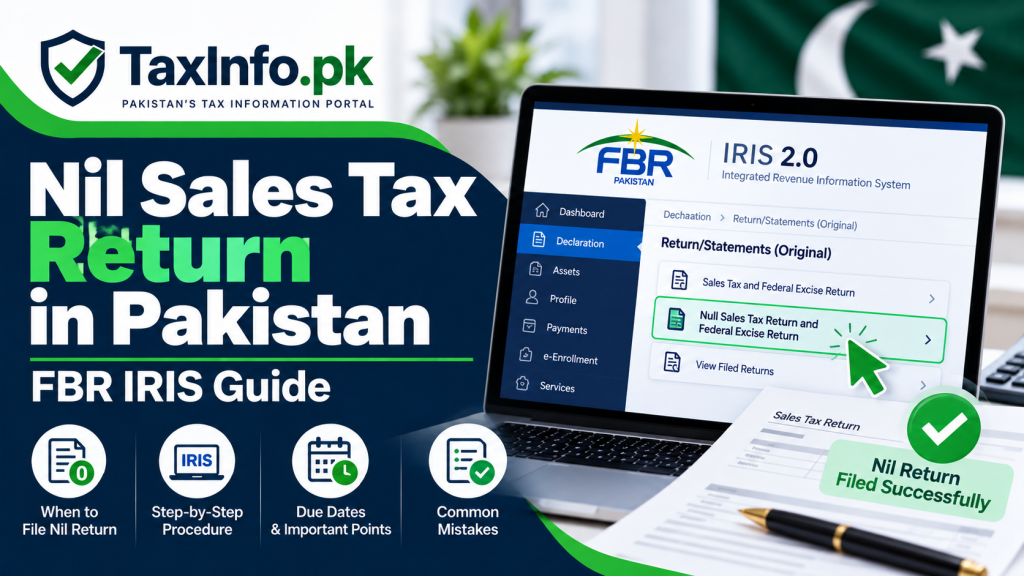
FBR provides a dedicated Null Return option through IRIS.
The following steps are based on FBR’s official Null Sales Tax Return instructions.
Step 1 – Log In to FBR IRIS
Open the official FBR IRIS 2.0 portal.
Enter your registration details and password to log in.
After successful login, IRIS will take you to the taxpayer dashboard.
Always use the official FBR portal when entering your tax credentials.
Step 2 – Open the Declaration Menu
From the IRIS main dashboard, go to:
Declaration
FBR’s official instructions place the Null Return option within this area of the IRIS mega menu.
Because FBR may update the appearance of IRIS over time, menu positioning can change even when the underlying filing facility remains available.
Step 3 – Select “Null Sales Tax Return and Federal Excise Return”
Under the relevant Return/Statements (Original) section, select:
Null Sales Tax Return and Federal Excise Return
This wording is important because it is the title used in FBR’s official IRIS instructions.
Do not accidentally open the normal Sales Tax and Federal Excise Return if your circumstances genuinely qualify for the Null Return facility.
Step 4 – Select the Correct Tax Period
Select the tax period for which you need to file the Null Return.
Check the period carefully before proceeding.
Filing against the wrong period can create unnecessary compliance problems and may require corrective action later.
Before submission, confirm that:
- the selected tax period is correct;
- the business had no activity requiring a normal return for that period; and
- you have not overlooked purchases, sales or other reportable transactions.
Step 5 – Review the Null Return
Review the statement before submission.
Do not treat the Null Return facility as a shortcut merely because preparing a normal Sales Tax Return would require more work.
If there were reportable transactions, use the appropriate return rather than declaring a period as Null incorrectly.
Where there is uncertainty, review your:
- sales records;
- purchase records;
- invoices;
- accounting records;
- input tax;
- output tax; and
- other Sales Tax information
before submitting.
Step 6 – Submit the Return
Once you are satisfied that the selected tax period and Null Return treatment are correct, complete the submission through IRIS.
Follow any confirmation or verification steps displayed by the current system.
After successful submission, keep appropriate evidence of filing for your records.
What If You Had Purchases but No Sales?
This is an important situation.
Having no sales does not necessarily mean that you had no reportable activity.
For example, a registered business may have:
- made purchases;
- received Sales Tax invoices;
- acquired business inputs;
- accumulated input tax; or
- carried out other transactions during the period,
even though it made no taxable sales.
In such circumstances, do not automatically choose a Null Return.
FBR’s normal Sales Tax Return is designed to report transactions, including input and output tax information.
The correct filing treatment depends on the actual transactions and applicable Sales Tax rules.
What If Your Sales Tax Payable Is Zero?
A zero final tax liability and a Null Return are not necessarily the same thing.
Consider a simplified example:
A business has taxable sales and output tax during the month. It also has allowable input tax that offsets its output tax, resulting in zero net Sales Tax payable.
That does not mean the business had no activity.
The transactions may still need to be reported through the normal Sales Tax Return.
Therefore, avoid this assumption:
Tax payable = Rs. 0 → File Null Return
Instead ask:
Were there transactions or other information that must be reported for the tax period?
If yes, the normal Sales Tax Return may be the appropriate filing route.
Nil Sales Tax Return vs Normal Sales Tax Return
| Point | Nil / Null Return | Normal Sales Tax Return |
|---|---|---|
| Business activity | Intended for an appropriate no-activity period | Used where reportable transactions exist |
| Sales information | No relevant activity to report | Sales may be reported |
| Purchase information | No relevant activity requiring normal reporting | Purchases/input tax may be reported |
| Input/output tax | No transaction-based reporting requiring normal return | Input/output tax can be declared |
| Final tax payable | May be nil | Can be payable, nil, excess input or otherwise as applicable |
| IRIS option | Null Sales Tax Return and Federal Excise Return | Normal Sales Tax and Federal Excise Return |
The important question is therefore not simply whether tax payable is zero.
The nature of the activity during the tax period matters.
Do Registered Persons Still Need to File a Return When There Is No Activity?
Do not assume that having no business activity automatically allows a registered taxpayer to ignore Sales Tax return compliance.
FBR states that every person registered under the Sales Tax Act, 1990 or Federal Excise Act, 2005 is required to file a Sales Tax Return.
The existence of FBR’s dedicated Null Return facility is particularly useful for periods where the appropriate return is genuinely a Null Return.
If the business has permanently stopped operating rather than merely having an inactive month, repeatedly filing Null Returns may not always be the long-term solution.
Where the taxpayer genuinely qualifies to end Sales Tax registration, see our Sales Tax Deregistration in Pakistan – FBR Procedure guide.
Sales Tax Return Due Dates in Pakistan
Under FBR’s standard monthly procedure, the general timeline currently includes:
- 10th: Annexure C;
- 15th: payment; and
- 18th: electronic filing of the return
of the month following the relevant tax period.
FBR explains these standard dates in its official Sales Tax Due Dates guidance.
However, not every registered person necessarily follows an identical filing schedule. Certain taxpayer categories may be subject to different monthly, quarterly, annual or sector-specific requirements.
Also remember that FBR can issue specific deadline extensions.
Therefore, always check the deadline applicable to your taxpayer category and tax period rather than relying permanently on a date saved from an older return.
What Happens If You Do Not File a Sales Tax Return?
Leaving a required return unfiled can create compliance problems.
FBR states that a Sales Tax Return that remains unfiled for more than six months after its due date can only be filed after approval of the Commissioner Inland Revenue having appropriate jurisdiction.
Late or non-filing can also have consequences under the applicable Sales Tax law and may affect the taxpayer’s compliance status.
Therefore, if your period genuinely qualifies for a Null Return, it is generally better to use the appropriate FBR filing facility rather than simply ignoring the return.
Common Nil Sales Tax Return Filing Mistakes
1. Looking for a Menu Called “Nil Return”
FBR uses the wording “Null Sales Tax Return and Federal Excise Return.”
Look for the official terminology inside IRIS.
2. Filing Null Return Just Because Tax Payable Is Zero
Zero tax payable does not necessarily mean zero business activity.
Review the transactions first.
3. Ignoring Purchases Because There Were No Sales
A period with no sales can still contain purchases or other reportable activity.
Do not automatically classify it as a Null Return.
4. Selecting the Wrong Tax Period
Check the month/tax period carefully before submitting.
5. Filing Null Return Without Checking Accounting Records
Review sales, purchases, invoices and other relevant records before declaring that the period had no activity.
6. Simply Not Filing Anything
A registered taxpayer should not assume that inactivity removes the filing obligation.
Use the appropriate return facility.
7. Filing Repeated Null Returns After Permanently Closing the Business
If the business has permanently ceased and the legal requirements for deregistration are satisfied, consider whether Sales Tax deregistration is the appropriate next compliance step.
How Can You Check Your Sales Tax Registration Status?
If you are unsure about your current Sales Tax registration or active status, use FBR’s relevant verification facilities.
TaxInfo.pk’s Check STRN Online in Pakistan – FBR Sales Tax Verification Guide explains how Sales Tax registration and Sales Tax ATL status differ and how to check the relevant information.
Remember that Sales Tax registration status and Sales Tax ATL status are related concepts but should not automatically be treated as identical.
Frequently Asked Questions
What is a Nil Sales Tax Return in Pakistan?
A Nil Sales Tax Return generally refers to a return for an appropriate tax period where the registered taxpayer has no activity requiring reporting through the normal Sales Tax Return. FBR calls its dedicated facility the Null Sales Tax Return and Federal Excise Return.
Does FBR call it a Nil Return or Null Return?
FBR’s official IRIS documentation uses “Null Sales Tax Return and Federal Excise Return.” Taxpayers commonly use “Nil Return” when referring to this type of filing.
Where can I find the Null Sales Tax Return in IRIS?
After logging into IRIS, go to Declaration and locate Null Sales Tax Return and Federal Excise Return under the relevant original return/statements section.
Can I file a Null Return if my tax payable is zero?
Not automatically. A normal Sales Tax Return can result in zero tax payable even when sales, purchases, input tax, output tax or other reportable transactions occurred.
What if I made purchases but no sales?
Do not automatically file a Null Return. Purchases and input tax may constitute information requiring reporting through the normal Sales Tax Return, depending on the circumstances.
Do I need to file a Sales Tax Return if there was no business activity?
Registered taxpayers remain subject to applicable return-filing requirements. FBR provides a dedicated Null Return facility for an appropriate no-activity period.
What is the normal monthly Sales Tax return filing date?
Under FBR’s standard monthly procedure, payment is generally due by the 15th and electronic filing by the 18th of the following month, with Annexure C by the 10th. Different categories or specific extensions can apply.
What if I have permanently closed my business?
If the business has permanently ceased and you satisfy the applicable conditions, review whether Sales Tax deregistration is appropriate instead of continuing to file Null Returns indefinitely.
Final Words
Filing a Nil Sales Tax Return in Pakistan is straightforward when the tax period genuinely qualifies for FBR’s Null Sales Tax Return and Federal Excise Return facility.
The most important point is to distinguish between:
no reportable activity
and
zero final tax payable.
They are not automatically the same.
Log in through the official FBR IRIS portal, select the correct Null Return facility, choose the correct tax period, review your accounting records and submit only when the period genuinely qualifies.
If transactions occurred during the period, use the appropriate normal Sales Tax Return instead.