Filing a Sales Tax Return is one of the key ongoing compliance responsibilities after obtaining Sales Tax registration in Pakistan.
A Sales Tax Return is more than simply entering your total monthly sales.
It is a declaration through which a registered taxpayer reports relevant transactions for a tax period and determines the applicable output tax, input tax and resulting sales tax liability or other tax position.
FBR states that every person registered under the Sales Tax Act, 1990 or Federal Excise Act, 2005 is required to file a Sales Tax Return.
If your business has not yet completed registration, first see our Sales Tax Registration in Pakistan – FBR IRIS Step-by-Step Guide.
This guide explains the practical filing process through FBR IRIS.
Table of Contents
What Is a Sales Tax Return?
FBR describes a Sales Tax Return as a taxpayer’s declaration through which details of transactions for a particular tax period are furnished and the applicable Sales Tax liability is dealt with.
The return includes the relevant input tax and output tax. Where input tax exceeds output tax, the applicable excess input or refund position may also be declared subject to law.
In simplified form:
Sales → Output Tax
Purchases → Eligible Input Tax
Then the applicable rules determine the resulting tax position.
However, this simple formula should not be treated as permission to claim every amount of sales tax appearing on a purchase invoice. Input tax must satisfy the requirements and restrictions of the Sales Tax Act and applicable rules.
Who Is Required to File a Sales Tax Return?
FBR states that every person registered under the Sales Tax Act, 1990 or Federal Excise Act, 2005 is required to file the applicable return.
The current Sales Tax Act available from FBR is amended up to 30 June 2026.
This means obtaining Sales Tax registration brings continuing compliance responsibilities.
A taxpayer should not assume:
“I had no sales this month, so I can simply ignore the return.”
Where a return is legally required, the appropriate return—including a null return where applicable—should be considered rather than leaving the tax period unattended. FBR’s current IRIS help resources specifically include guidance for Null Sales Tax and Federal Excise Return filing.
What Should You Prepare Before Filing?
Before opening the return, prepare the records for the relevant tax period.
Important information can include:
- Sales invoices
- Purchase invoices
- Import information, where applicable
- Debit or credit notes, where applicable
- Output tax details
- Input tax records
- Withholding information, where applicable
- Previous adjustments or carry-forward information
- Payment information
- Business accounting records
The figures entered in IRIS should be supported by proper records rather than estimated simply to complete the return.
How to File Sales Tax Return Through FBR IRIS
FBR has published a current user guide for its new Sales Tax and Federal Excise Return workflow. The practical process can be understood as follows.
Step 1: Log In to FBR IRIS
Open the official FBR IRIS portal and log in using your taxpayer credentials.
If you cannot access your account, see our FBR IRIS Login, Forgot Password & Account Recovery Guide.
Do not create a duplicate registration merely because you cannot remember your existing login credentials.
Step 2: Open the Sales Tax Return
After successful login, FBR’s current guide instructs taxpayers to go to:
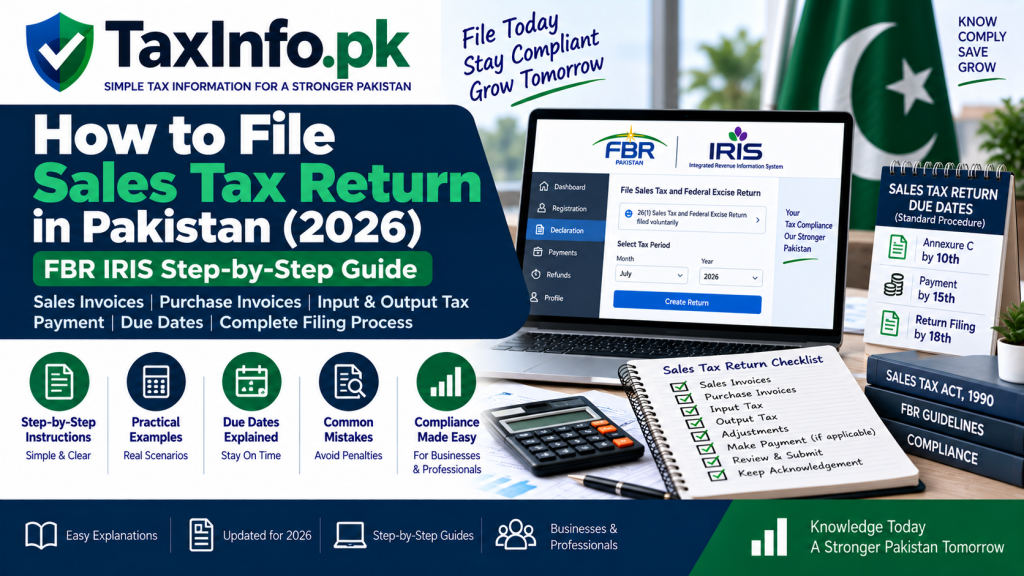
Declaration → 26(1) (Sales Tax and Federal Excise Return filed voluntarily)
IRIS then opens the return task and asks the taxpayer to select the relevant tax period.
Because IRIS can be updated over time, follow the current form description if the visual menu arrangement changes.
Step 3: Select the Correct Tax Period
Choose the period for which the Sales Tax Return is being filed.
This step requires care.
A return for one month should not accidentally be prepared under another month’s tax period.
Before proceeding, confirm:
Month / Period → Year → Taxpayer → Business
against your accounting records.
Step 4: Review and Manage Sales Invoices
Your sales information is central to calculating output tax.
FBR’s current IRIS portal includes Sales Invoice Management resources as part of the Sales Tax filing system.
Sales records should correspond with the actual taxable supplies made during the relevant period.
Depending on the taxpayer’s activities, information can include:
Invoice number
Invoice date
Buyer information
Value of supply
Applicable sales tax
Nature/category of supply
Incorrect or missing invoice information can affect the final return.
Step 5: Review Purchase Invoices
Next, review the purchases relevant to the tax period.
FBR provides Purchase Invoice Management resources in IRIS, including guidance for managing purchase invoices.
Do not simply claim every purchase invoice as input tax.
Check that the purchase is genuine, relates appropriately to the business and satisfies the conditions for input-tax treatment under applicable law.
Understanding Output Tax
Output tax broadly refers to Sales Tax charged or payable on taxable supplies made by the registered person, subject to the applicable law.
For a simplified illustration:
Taxable sales:
Rs. 1,000,000
Assume applicable Sales Tax:
Rs. 180,000
Output tax:
Rs. 180,000
This example is purely illustrative. The actual rate and treatment depend on the goods, transaction and current law.
Understanding Input Tax
Input tax broadly relates to Sales Tax paid or payable on eligible business purchases/imports that may be claimable subject to statutory conditions and restrictions.
For example, suppose eligible input tax for the period is:
Rs. 120,000
and output tax is:
Rs. 180,000
A simplified comparison would be:
Output Tax: Rs. 180,000
Less eligible Input Tax: Rs. 120,000
Difference: Rs. 60,000
But the actual payable amount can be affected by restrictions, adjustments, withholding, previous balances and other applicable provisions.
Therefore, never calculate a real Sales Tax Return solely from this simplified example.
Step 6: Review Input and Output Tax
Once invoice information has been properly entered or reconciled, review the resulting input and output tax figures.
FBR states that the return declares the relevant input tax and output tax for the tax period.
Before proceeding, reconcile the return against your records.
A useful check is:
Total Sales in IRIS ↔ Sales Records
Total Purchases in IRIS ↔ Purchase Records
Output Tax ↔ Sales Invoices
Input Tax ↔ Eligible Purchase/Import Evidence
Large unexplained differences should be investigated before submission.
Step 7: Review Adjustments and Other Applicable Information
Not every business will have a straightforward sales-minus-purchases calculation.
Depending on the taxpayer, the return may involve additional information such as:
- Credit/debit adjustments
- Imports
- Withholding
- Carry-forward amounts
- Exempt or zero-rated transactions
- Other applicable annexures
- Sector-specific information
Only enter information that genuinely applies to the taxpayer.
Step 8: Check the Tax Payable
After completing the applicable sections, review the tax calculation carefully.
Do not proceed merely because IRIS produces a number.
Compare the resulting liability with your own accounting and invoice records.
If the result is materially different from what your records suggest, investigate the difference first.
Step 9: Pay Sales Tax Where Required
Where tax is payable, payment should be completed through the applicable FBR payment mechanism.
IRIS currently provides an e-Payments → Sales Tax facility.
Payment records should be retained and reconciled with the return.
Our upcoming guide on FBR Tax Payment Online – PSID & CPR Step-by-Step Guide will explain the payment process separately.
Step 10: Review the Return Before Submission
Before clicking the final submission option, perform a complete review.
Check:
Tax period
Sales
Purchases
Output tax
Eligible input tax
Adjustments
Tax payable
Payment
Applicable annexures
Invoice records
Once satisfied, proceed with final submission according to the current IRIS workflow.
Step 11: Keep Evidence of Submission
After successful filing, retain evidence that the return was submitted.
Your records should include, where applicable:
- Filed return
- Relevant acknowledgement
- Sales and purchase records
- Payment evidence / CPR
- Supporting invoices
- Adjustment documents
- Accounting reconciliation
These records can be important if the return is later reviewed or reconciled.
What Is the Sales Tax Return Due Date?
This needs careful treatment because different filing requirements and taxpayer categories can apply.
FBR’s general guidance currently states that under the standard monthly procedure, Annexure C is due on the 10th, payment on the 15th, and the return by the 18th day of the following month. FBR also notes that certain taxpayer categories follow monthly, quarterly or annual procedures.
Therefore, do not assume that every Sales Tax compliance action has the same date.
For a standard monthly case, think in terms of:
10th → Annexure C
15th → Payment
18th → Return
But always verify the applicable current deadline and taxpayer category before filing because special procedures or extensions can affect a particular case.
Monthly, Quarterly and Annual Returns
FBR’s published guidance identifies multiple return categories.
For the standard procedure, registered persons generally file monthly returns. Certain specified taxpayers can have quarterly requirements, while FBR also describes an annual Sales Tax Return requirement for manufacturers.
A taxpayer should therefore identify the filing category applicable to its registration and business rather than assuming that another business’s schedule applies.
What If There Were No Sales During the Month?
Having no sales does not automatically mean that a registered taxpayer should ignore the filing period.
FBR’s IRIS resources include a dedicated Null Sales Tax and Federal Excise Return filing process.
If a registered person is required to file for the period but has no relevant transactions, the applicable null-return procedure should be considered.
Do not fabricate sales or purchase figures merely to submit a return.
What If the Sales Tax Return Is Filed Late?
Late filing should not be treated casually.
FBR states that where a Sales Tax Return has not been filed within six months after its due date, it can only be filed after approval of the Commissioner Inland Revenue having appropriate jurisdiction.
Other consequences of late or incorrect compliance depend on the applicable provisions and circumstances.
Therefore, if a return is overdue, determine the correct procedure rather than repeatedly attempting an incorrect filing.
Can a Sales Tax Return Be Revised?
Yes, the Sales Tax framework provides a mechanism for revised returns, subject to applicable legal requirements and procedure.
However, revision should not be used simply to experiment with figures after submission.
If an error is discovered, first identify:
What is wrong?
Which tax period is affected?
Does the correction change tax liability?
What supporting evidence exists?
Then follow the applicable FBR revision procedure.
Sales Tax Return vs Income Tax Return
These are separate tax compliances.
A Sales Tax Return generally reports relevant sales-tax transactions, input tax, output tax and resulting sales-tax position for the applicable tax period.
An Income Tax Return reports income and determines the taxpayer’s income-tax position for the relevant tax year.
Filing one does not automatically satisfy the other.
For income tax filing, see our How to File Income Tax Return Online in Pakistan – FBR IRIS Guide.
Common Sales Tax Return Filing Mistakes
Common problems include:
- Selecting the wrong tax period
- Missing sales invoices
- Claiming unsupported input tax
- Failing to reconcile purchase invoices
- Confusing gross purchases with eligible input tax
- Ignoring credit/debit adjustments
- Filing without checking payment
- Using estimated figures instead of records
- Ignoring a period because there were no sales
- Filing Sales Tax figures that do not reconcile with business records
- Assuming Sales Tax and Income Tax returns are the same compliance
A good Sales Tax Return should be based on proper records rather than simply completing every visible field in IRIS.
Frequently Asked Questions
Who has to file a Sales Tax Return in Pakistan?
FBR states that every person registered under the Sales Tax Act, 1990 or Federal Excise Act, 2005 is required to file the applicable Sales Tax Return.
Where is the Sales Tax Return filed?
FBR currently provides Sales Tax Return filing through IRIS. Its current guide directs taxpayers to Declaration → 26(1) (Sales Tax and Federal Excise Return filed voluntarily).
What is input tax?
Input tax broadly relates to Sales Tax on eligible purchases/imports that may be claimable subject to applicable legal conditions and restrictions.
What is output tax?
Output tax broadly refers to Sales Tax charged or payable on taxable supplies, subject to the applicable Sales Tax law.
Can I claim every purchase invoice as input tax?
No. Input-tax eligibility is governed by the Sales Tax Act and applicable rules. A purchase invoice should not automatically be claimed merely because Sales Tax appears on it.
What if I have no sales for the month?
Do not simply ignore the return. FBR provides a Null Sales Tax and Federal Excise Return process for applicable cases.
What are the standard monthly Sales Tax dates?
FBR’s current general guidance states Annexure C by the 10th, payment by the 15th and return by the 18th of the following month under the standard procedure. Special categories or changes can apply.
What if my return is more than six months late?
FBR states that a Sales Tax Return not filed within six months after its due date can only be filed after approval of the Commissioner Inland Revenue having appropriate jurisdiction.
Do I need to file an Income Tax Return separately?
Yes, where applicable. Sales Tax Return and Income Tax Return are separate compliance requirements.
Final Words
Sales Tax Return filing becomes easier when the process is approached as a reconciliation rather than a form-filling exercise.
The practical workflow is:
Prepare Records → Select Tax Period → Review Sales → Review Purchases → Determine Input & Output Tax → Check Adjustments → Pay Liability → Review → Submit → Keep Records
The most important principle is:
Your IRIS return should agree with genuine business records and supporting invoices.
Do not claim unsupported input tax or submit figures merely to complete the return.
Official FBR Sources
FBR – Current Sales Tax Return Filing Guide
Disclaimer
This article is for general educational and informational purposes only and does not constitute tax, legal or professional advice. Sales Tax filing requirements, input-tax eligibility, due dates, annexures and procedures can vary according to taxpayer category, transaction and applicable law. FBR may also update IRIS and filing procedures. Always verify the current Sales Tax Act, applicable rules and FBR instructions before filing a return or claiming input tax.